Which AI tools does your organisation use? Your filter logs already know.
shadow-ai-report turns a DNS or web-filter export into a one-file report for managers: which AI tools were reached, by how many people, how often, and which ones carry risk. It runs on your own computer and sends nothing anywhere.
$ shadow-ai-report example-dns-log.csv -o report.html
Read example-dns-log.csv: 3,003 lines, 3,000 used, 3 skipped

  AI tools detected      25
  AI-tool requests       556 (18.5% of all requests)
  Users/devices on AI    26 of 40
  AI requests blocked    11
  High risk/exposure     2 tool(s)

  Top tools:
    ChatGPT            110 requests  (risk medium)
    Perplexity AI       49 requests  (risk medium)
    OpenAI              39 requests  (risk medium)

Report written: report.html
One page your management can read in two minutes
Built from a synthetic example log. Open the full example report to see every section.
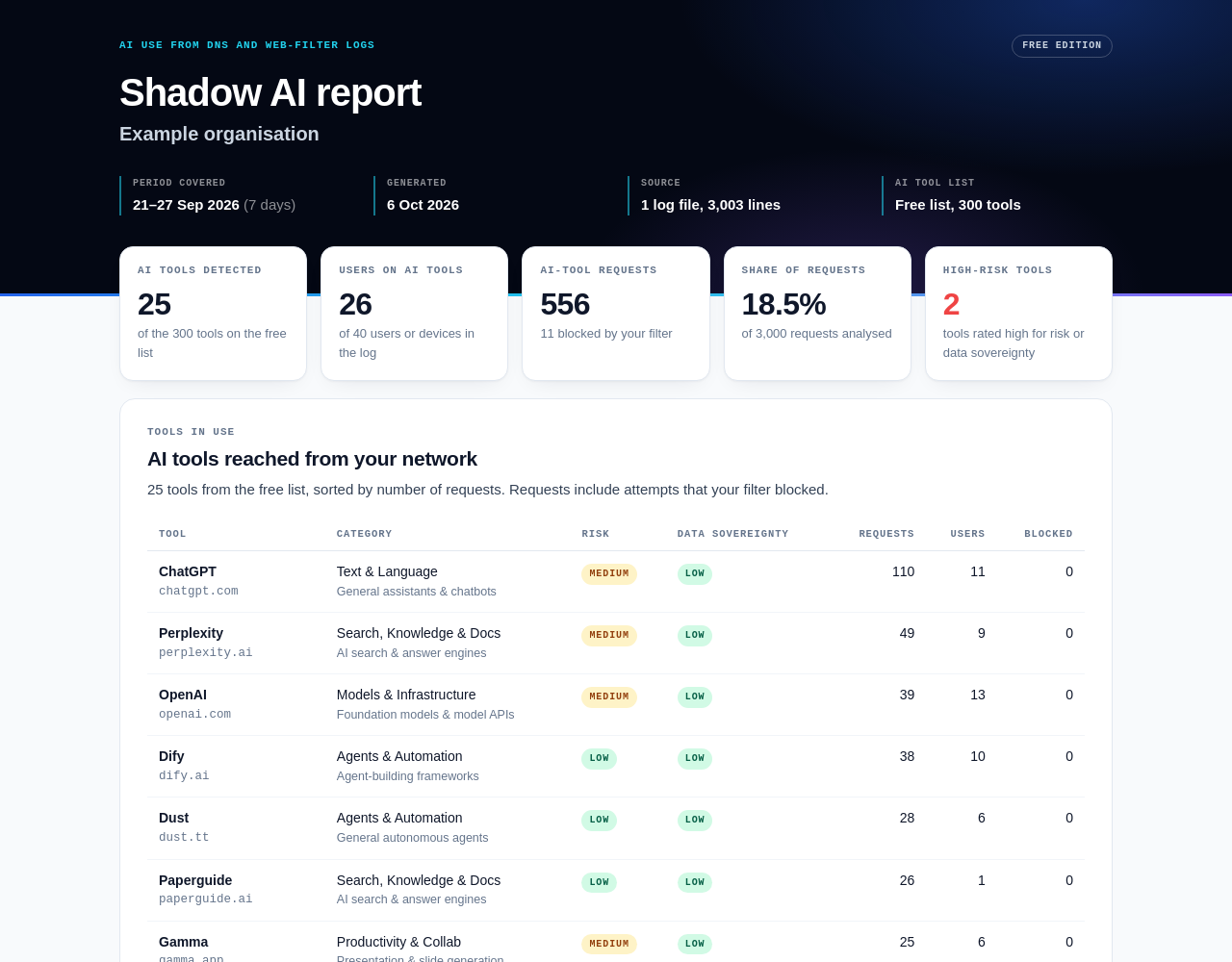
Headline numbers
AI tools detected, people or devices using them, AI requests and their share of all traffic, requests your filter already blocked.
Risk flags explained
Every tool rated high or medium for risk or data sovereignty, with a plain-language reason managers can act on.
People, handled with care
Top users and devices by AI use, or stable pseudonyms with --anonymise. Plus a CSV and JSON of every number for audit.
From nothing to your first report in four steps
Works on Windows, macOS and Linux with Python 3.8 or newer. Nothing else is installed.
Make a folder and a virtual environment
Keeps the tool separate from the rest of your Python.
mkdir shadow-ai-test && cd shadow-ai-test
python3 -m venv .venv
. .venv/bin/activate # Windows: .venv\Scripts\activateInstall the package
Straight from this page. The file's SHA-256 is listed under Download.
pip install https://www.shadowaitools.com/free-shadow-ai-report/shadow_ai_report-0.2.0-py3-none-any.whl
Try it on the example log
A synthetic week of DNS traffic from 40 users. Then open report.html in your browser.
curl -O https://www.shadowaitools.com/free-shadow-ai-report/example-dns-log.csv
shadow-ai-report example-dns-log.csv -o report.html --org "Example organisation"
No curl? Download example-dns-log.csv into the folder instead.
Run it on your own export
Any CSV, TSV or text export with a domain, host, query or URL column. User, device and time columns are picked up when present. Cloudflare Gateway DNS logs (Logpush, JSON lines, also gzipped) are read directly.
shadow-ai-report my-dns-export.csv -o shadow-ai-report.html --org "Your organisation" --anonymise
shadow-ai-report gateway_dns_*.json.gz -o report.html --format cloudflare-dns
Works with the export you already have
Any filter's CSV
DNS filters, secure web gateways, proxies and firewalls: the column with the domain or URL is found automatically, as are user, device, time and action columns.
Cloudflare Gateway
DNS logs from Logpush (the gateway_dns dataset), plain or gzipped, read with the field names from Cloudflare's public documentation.
Large files
Streams line by line: a 2-million-line gzip export took under 20 seconds and about 15 MB of memory in our test. Unreadable lines are counted and reported, not hidden.
The free report shows where AI is used. The full audit shows what it costs you.
Upload the same export to a full Shadow AI audit when you need the complete picture for a board, an auditor or a client.
Tools recognised
Free: the 300 AI tools of the free list. Full audit: 11,863+ AI-tool domains, with new tools added every day.
Risk factors
Free: risk level and data sovereignty. Full audit: all 13 factors, including training on your data, opt-out, enterprise and API tiers, feedback exceptions and human review, with dated vendor terms.
Board-ready output
The full audit adds a designed PDF report, the sanctioned versus unsanctioned split from your own approved list, and recommended rules for your industry.
Your logs never leave your computer
Logs contain who visited what. Here is what you can verify yourself.
No network code
The package imports no networking library, and a test builds a full report with network access switched off. The report loads nothing from the internet.
Open source, Apache 2.0
Free for commercial use. Read every line: browse the source or download the source archive below.
Safe with odd logs
Everything taken from a log is escaped before it goes into the report, so a hostile log line cannot run code in your browser. This is tested.
Auditable numbers
The report states lines read, lines skipped and distinct domains, and --json / --csv write every figure to a file.
Checksums on every file
Compare the SHA-256 below with sha256sum (macOS: shasum -a 256) before you install.
Who is behind it
Alpha Quantum, enterprise software since 2007. The tool list comes from the open AI tools taxonomy dataset (CC BY 4.0).
Version 0.2.0
The package (wheel) installs with pip; the source archive contains the same code plus the tests and example logs.
Licence: Apache License 2.0 (code), CC BY 4.0 (AI tool list) · README · Copyright 2026 Alpha Quantum
Before you run it
Does a zero result mean nobody uses AI?
No. The free edition recognises the 300 AI tools of its list. Traffic to other AI tools counts as ordinary traffic. The full audit checks against 11,863+ AI-tool domains.
Which export should I use?
The one with a line per request and a domain, host, query or URL column: DNS query logs are ideal. Include a user, device or IP column if you want per-person numbers.
Is it legal to report on individual users?
That depends on your jurisdiction and your policies. Use --anonymise to replace users, e-mail addresses, devices and IPs with stable pseudonyms, and check with your data protection lead.
Can I use it for clients?
Yes. The Apache License 2.0 allows commercial use. Keep the licence and notice files, and the attribution for the AI tool list.
Need the complete picture?
11,863+ AI tools, 13 risk factors, dated vendor terms and a board-ready PDF, from the same export.
